Google Play Store PC
Gives you access to any type of Apk Android App on your Windows PC.
Safe & Secure
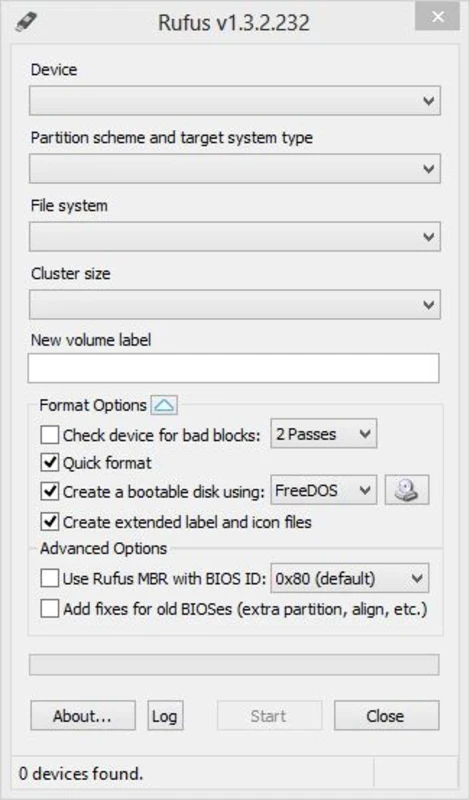
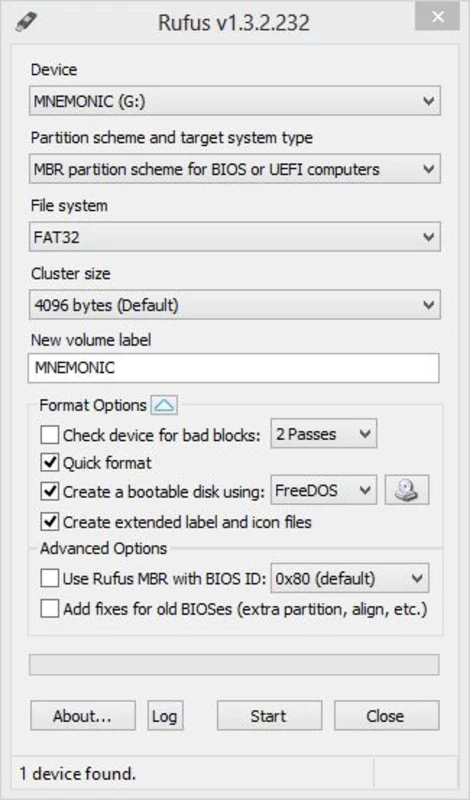
Rufus Portable is a simple yet efficient utility used for converting any pen drive into a bootable USB drive, offering portable capability while allowing you to use it without a standard installation process. It offers configuring options, such as format type, and file system using a long list of options, ensuring to start in MS-DOS.
The lightweight utility runs as a standalone executable, requiring file size from 1.9 MB, to 6 MB can easily be stored, equally useful for both technically inclined users and IT professionals. The simplicity of the interface and support for a wide range of Windows-based and Linux-based operating systems make the app one of the most popular utilities across the world.
Rufus Portable, developed by Pete Batard, falls under System Utilities and is freeware software. It is a lightweight, standalone utility based on the official Rufus to allow users to create bootable USB drives on Windows. It is available in ISO image format.
It is the best combination of speed, simplicity, and other capabilities, proving the best solution in different scenarios, such as system administration, tech professions, and advanced functionalities. It handles system installations efficiently, allowing an easy setup of BIOS or UEFI-bootable drives.
The app offers seamless compatibility with multiple Windows-based as well as Linux-based operating systems, such as Ubuntu, Red Hat, Debian, Fedora, Gentoo, Arch Linux, and Taila. This versatility and flexibility helps users to get rid of the frustration of not loading another operating system, specifically for new laptops, because they don’t have support for DVD or Blu-ray drives. The app fixes the issue, allowing users to create a bootable USB and making the installation of another operating system possible.
The portable utility gives a simple and easy start with an intuitive interface. It offers a wide variety of features to make the creation of a bootable USB drive easy, such as selecting the USB drive, the ISO image, or the disk image. You can also select the partition scheme and file system, and multilingual support allows users to select their own language to easily continue the workflow.
The support for multiple formats enables you to work with operating system images, such as ISO files, RAW image files, and even compressed files. It also supports multiple Windows-based file systems, including NTFS, FAT, exFAT, and FAT32, and for Linux images, it creates a bootloader to make the drive bootable. GRUB and SYSLINUX are supported bootloaders, and support for UEFI boot is also added through version 1.3.2. It also provides functionality for computing SHA-256, SHA-1, and MD5 hashes for testing the image for corruption.
The lightweight size, offering a small footprint on the host system, and the portable edition make the app the most appreciated tool available in its category. So, no need to install; simply run it through the executable file. It doesn’t affect the memory of the host system, as it creates a configuration file along with the main executable in the same location.
Automatic detection for connected devices offers a smooth user experience, ensuring an easy way to configure partition schemes and target systems. The free-to-use and open-source utility offers awesome services, combining reliability, portability, and speed. It helps to manage the installation of multiple operating systems across a variety of personal and professional scenarios, proving to be one of the trusted tools for bootable media.
The user interface offers a minimalistic and straightforward layout that isn’t modern or flashy, offering all important functions on the main screen. So, there is easy configuration available for bootable USB, instead of navigating through complex menus. The highly functional UI focuses on performance and usability.
The use of standard interface components makes compatibility with accessibility tools fast and easy. So, you can use keyboard navigation and screen readers. No doubt, the app is a fast, portable, and dependable tool, but it supports single-boot USB creation and does not support multi-boot USB drives. If you want multi-boot functionality, you have to go for other alternatives.
The app is regularly updated, focusing on hardware compatibility improvements and ISO handling refinements. You will find enhanced support for modern Windows versions, updated UEFI requirements, and also fixes for edge cases incorporating the latest USB controllers. Developers also fixed the issue of detecting corrupted ISOs and logging for troubleshooting. The updates make awesome changes and fixes, but don’t change the interface, strengthening reliability and stability.
Pros
Cons

Gives you access to any type of Apk Android App on your Windows PC.

PC App Store download, install, and keeps up-to-date your PC programs
free emulator to play Android apps on your pc with extra performance, reliability

Bijoy Bayanno the most powerful software to write Bengali language on PC

Media Creation Tool is upgrading and installing Windows 10 bootable installed disks.
Rufus easily change your USB Flash to a bootable ISO flash drives.